
Most readers will already be familiar with the Engineering Progress Reports provided daily by STA. We do these because we put a high priority on communication about your jobs. Which is also why we’ve now updated and improved them, following extensive consultations with a number of customers of varying size.
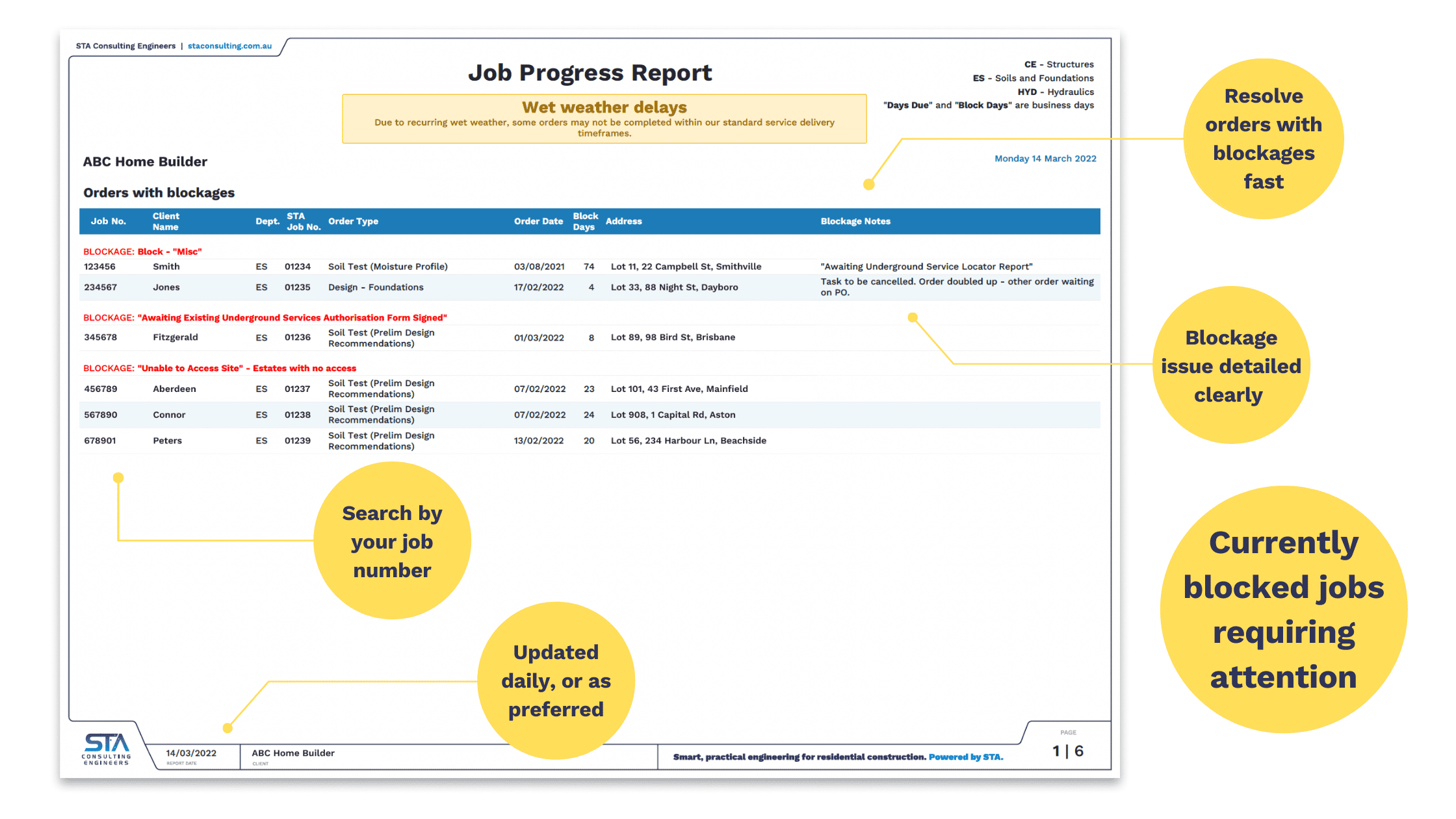
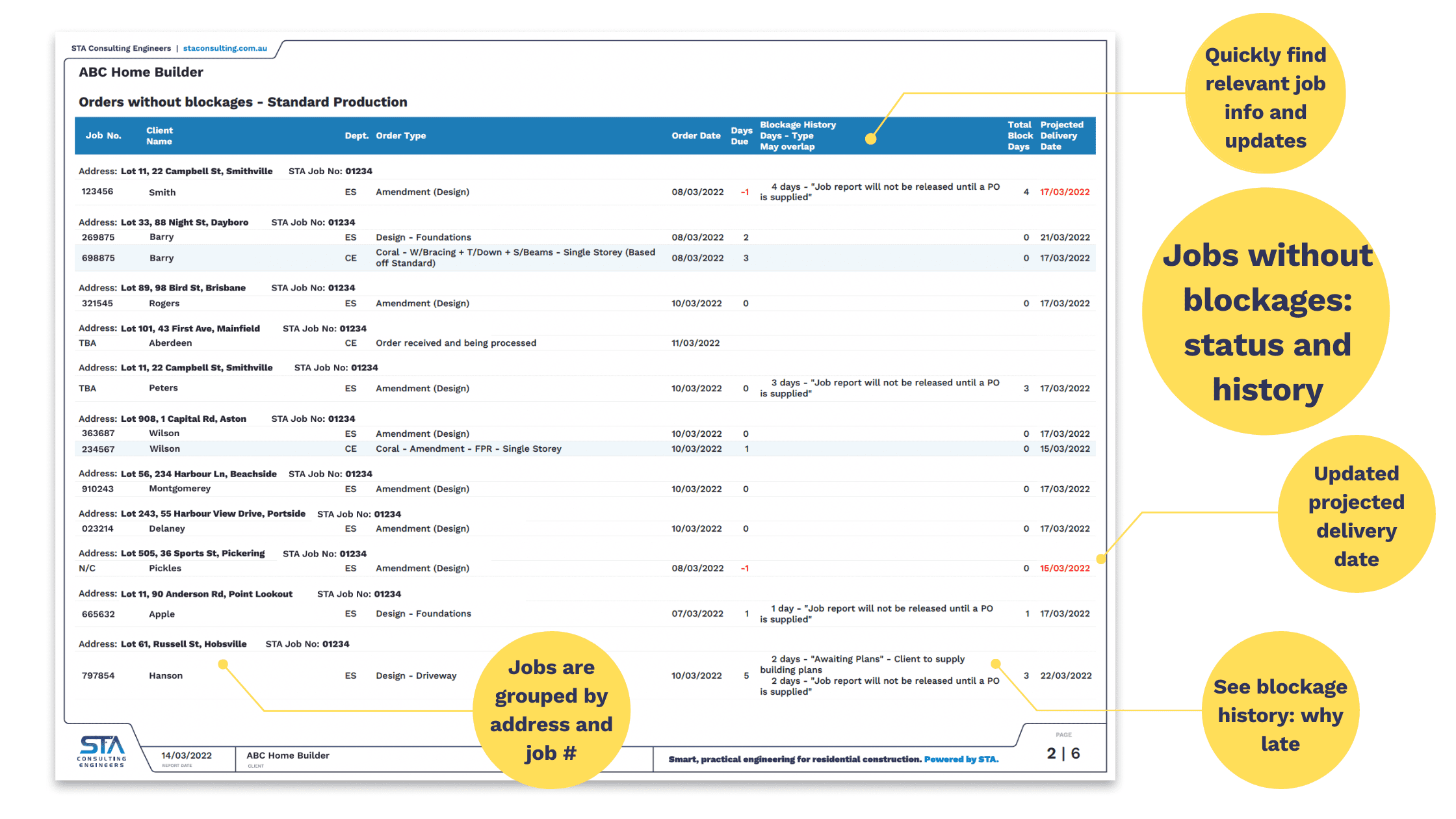
The big change is that the new reports are ‘dynamic’, with a changing Projected Delivery Date as circumstances arise. More on that later, but first, below is a visual of how the new reports look.
We think you’ll agree these new reports get right to the point.
A reminder of some important terminology
What do we mean by “days”?
Our reports are based on working days, so barring public holidays, a 10-day lead time means 10 working days, or two full weeks.
What is a “Block Day”?
This is a day that the job has been delayed (blocked) for some reason. For example, a delay due to:
- information or action still required from the client
- waiting on another service
- external blockages such as locked gates making a site inaccessible.
These blockages can last for more than one day.
What changes are being made?
Grouping the exceptions for faster action
The new Progress Report provides all the information you need, and groups it by the blockages — what’s not happening — for easier identification and action. Specifically, the jobs listed first are the ones with current blockages. These are sorted by blockage reason, highlighted in red, so you’ll know straight away what’s up and why. This way we can collectively act to solve issues, and keep things on time and on track.
After this, jobs with resolved (or no existing) blockages are grouped under the specific site address, on the following pages in the report.
Standardised “Reasons” shown for Blockages
Our engineers are great at engineering. Their work is precisely calculated. But when it comes to writing, there’s more scope for their individual styles. So, we’ve standardised the language and terminology in all the reasons for Block Days. This helps us to sort the jobs in the report by blockage reason, as mentioned above. Standardisation also gives you greater familiarity, clarity and quicker understanding of the issues. Some examples of standard reasons include:
- “Awaiting final updated plans for approval and certification”
- “Job report will not be released until a PO is supplied”
- “Awaiting Instruction from Client”
- “Unable to Access Site” – Locked gates
See the full list of Reasons at the end of this article.
Our team can still also include additional notes if needed.
New data points: better information
Some data points have been changed or added to the reports, as follows:
- Days Due – This counts down the number of days remaining before the Projected Delivery Date, helping everyone to stay informed, organised and motivated.
- Total Block Days – The number shown here is the total of days blocked for jobs with resolved blockages. These jobs also display the blockage history by listing reasons and number of days.
- Blockage History – Jobs with resolved blockages are indicated including the blockage duration, and reason for the resolved blockage.
- Projected Delivery Date – This is the dynamic difference between the new and old reports, which previously showed the delivery date advised at the beginning of the contracted work and did not change. Now, the date shown applies the standard lead time from the order date and adds any blocks, eg “waiting on documents”. If the standard lead time was 10 days, and the wait on the documents was three days, then the estimated delivery date will be 13 working days from the order date. The Projected Delivery Date adjusts accordingly. Jobs with current blockages need to have them resolved before a Projected Delivery Date can be updated. Once the block is resolved/removed, the job drops off the “Orders with blockages” page and gets added to the “Orders without blockages” page along with the duration of the block and the reason for it.
Days Due is at a negative and both it and Estimated Delivery Date turned red. What’s happening?
This means the contractual lead time plus any blockage days has expired, and that there is a delay at STA’s end. For example, we could be in an excessively busy period or may have had delays due to wet weather or site access problems. Sometimes things don’t go perfectly, and this ‘red alert’ helps us to reprioritise and recover.
Make contact for more info
We hope you find this optimised report format more useful for your business. If you have any questions we haven’t covered here, call us on (07) 3071 7444 (QLD), (02) 4032 6450 (NSW), or enquire using our Contact Form.
Full list of Blockage Reasons
Awaiting Final Review Documentation
Awaiting Final Updated Plans
Awaiting Workshop Drawings
Client to supply outstanding information
Client to supply building plans in DWG format
Block – “Misc” (notes will describe what is required)
Awaiting Floor System Layout
Awaiting Foundation Design (by STA)
Awaiting HYD Design (by STA)
Awaiting Instruction from Client
Awaiting Site Inspection
Awaiting Soil Test (by STA)
Awaiting Soil Test (Supplied by others)
Awaiting Truss Layout
Awaiting Wall Frame Layout
Awaiting Wind Rating (Supplied by others)
Awaiting Wind Rating (by STA)
Awaiting Client to Nominate Preferred Foundation Type
Clients to provide building plans
Awaiting Purchase Order
Awaiting Payment
Awaiting Level 1 Certification
Awaiting Soil test (Supplied by others)
Awaiting Soil test (by STA)
Awaiting Structural (by STA)
Unable to Access Site – Acreage House Location Info
Unable to Access Site – Builders Equipment, stockpiles etc
Unable to Access Site – Dogs or Animals
Unable to Access Site – Estates with no access
Unable to Access Site – Locked Gates